![[Review] From Inference to Interface: What I Learned from AMD AI Academy's "Building Your First AI Chatbot"](https://images.unsplash.com/photo-1677442136019-21780ecad995?auto=format&fit=crop&q=80&w=2532&ixlib=rb-4.0.3)
[Review] From Inference to Interface: What I Learned from AMD AI Academy's "Building Your First AI Chatbot"
By: Ngô Tấn Tài (Newnol)
Platform: AMD AI Academy
Lab / Course: Building Your First AI Chatbot
I recently completed the "Building Your First AI Chatbot" lab on AMD AI Academy. What made this learning experience especially valuable was that it did not stop at theory. Instead, it walked through the full beginner-friendly workflow of running a language model, chatting with it, shaping its behavior, and exposing it through a simple interface.
Compared to conceptual AI courses, this lab felt much more implementation-oriented. It helped me connect high-level ideas like inference and prompting to concrete Python code running on real hardware in the AMD Developer Cloud with an AMD MI300 GPU.
One thing that made this experience personally memorable was that it was the first time I got to use a real VM environment to work on AI hands-on with such a powerful GPU. Up to this point, most of my experimentation had been limited to smaller local setups or web-based tools. Running an actual model workflow in a cloud VM backed by AMD MI300 hardware made the experience feel much closer to real-world AI engineering.
1. Core Knowledge Gained
This lab gave me a practical introduction to several important building blocks behind modern AI chat systems:
- Understanding Inference in Practice: Instead of seeing inference as an abstract concept, I learned that it is simply the process of sending an input to a trained model and receiving a generated output. Running this directly in a notebook made the concept much clearer than just reading about it.
- Serving a Model with vLLM: The lab introduced
vLLMas the engine used to host and query the model efficiently. I learned how to initialize an LLM instance, load a model, and send structured chat messages to it through code. - Prompting and Role Control: One of the most useful lessons was understanding how system prompts shape the assistant's behavior. By changing the system instruction, the same model could act like a tutor, a pirate, or a Shakespeare-style chatbot.
- Generation Parameter Tuning: I also learned the practical role of
temperature,max_tokens, andtop_p. These parameters directly affect how creative, focused, or detailed a response becomes, which is essential knowledge when building any chatbot experience.
2. Hands-on Practice: What I Actually Built
What makes this lab stand out is that it includes real implementation work rather than only explanations. In the notebook, I practiced the complete chatbot flow step by step:
- Loading an Instruction Model: I worked with the model
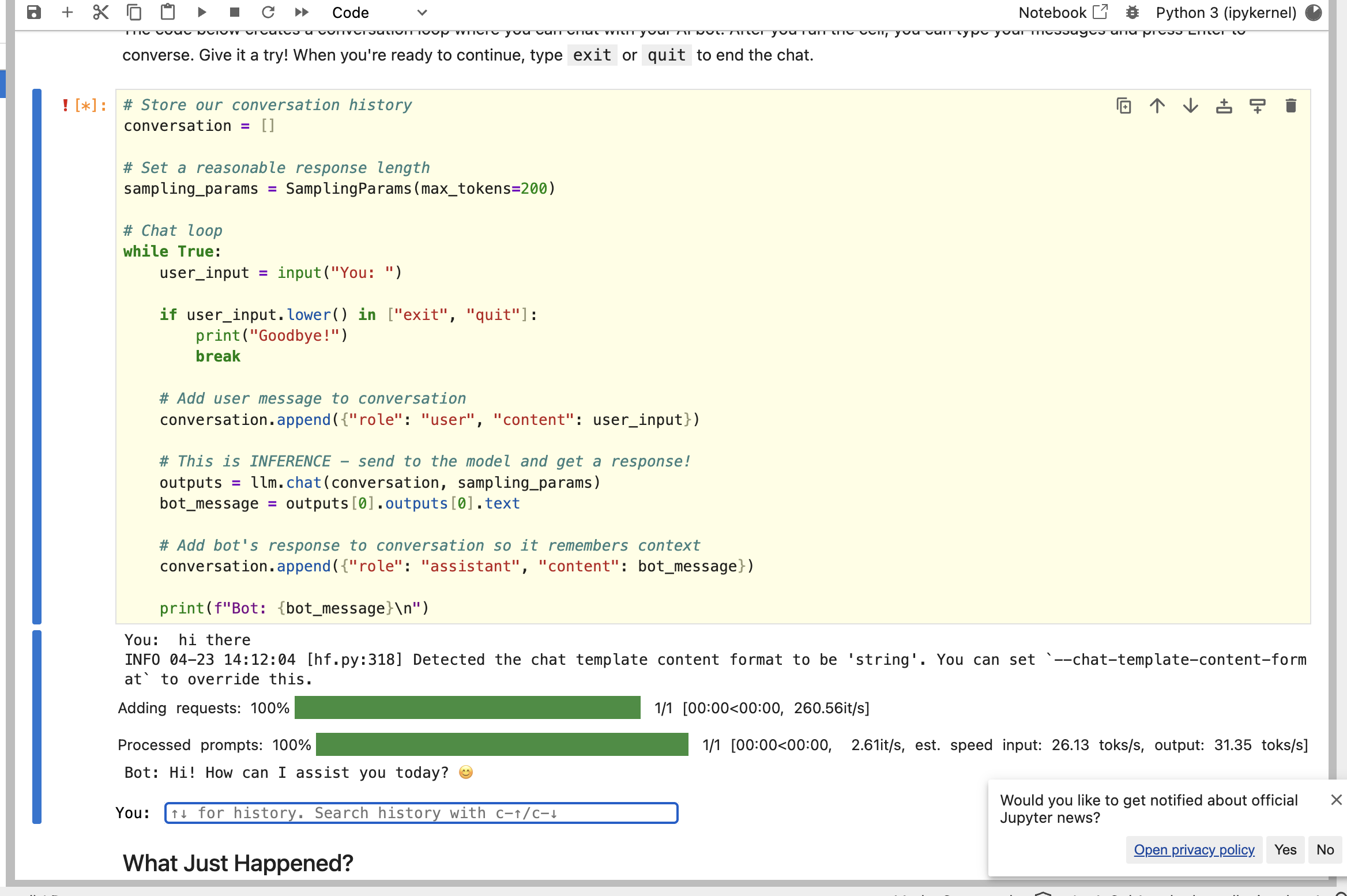
Qwen/Qwen3-4B-Instruct-2507and loaded it throughvLLMusing Python. This gave me a clearer understanding of how a deployed model becomes accessible in code. - Building a Basic Chat Loop: I implemented a conversation loop that stores both user and assistant messages. This helped me understand how context is preserved across turns instead of treating every prompt as isolated input.
- Customizing Behavior with a System Prompt: I experimented with a role-based chatbot by providing a custom system message. This showed me how personality, tone, and response style can be controlled without retraining the model.
- Testing Response Parameters: I compared low and high
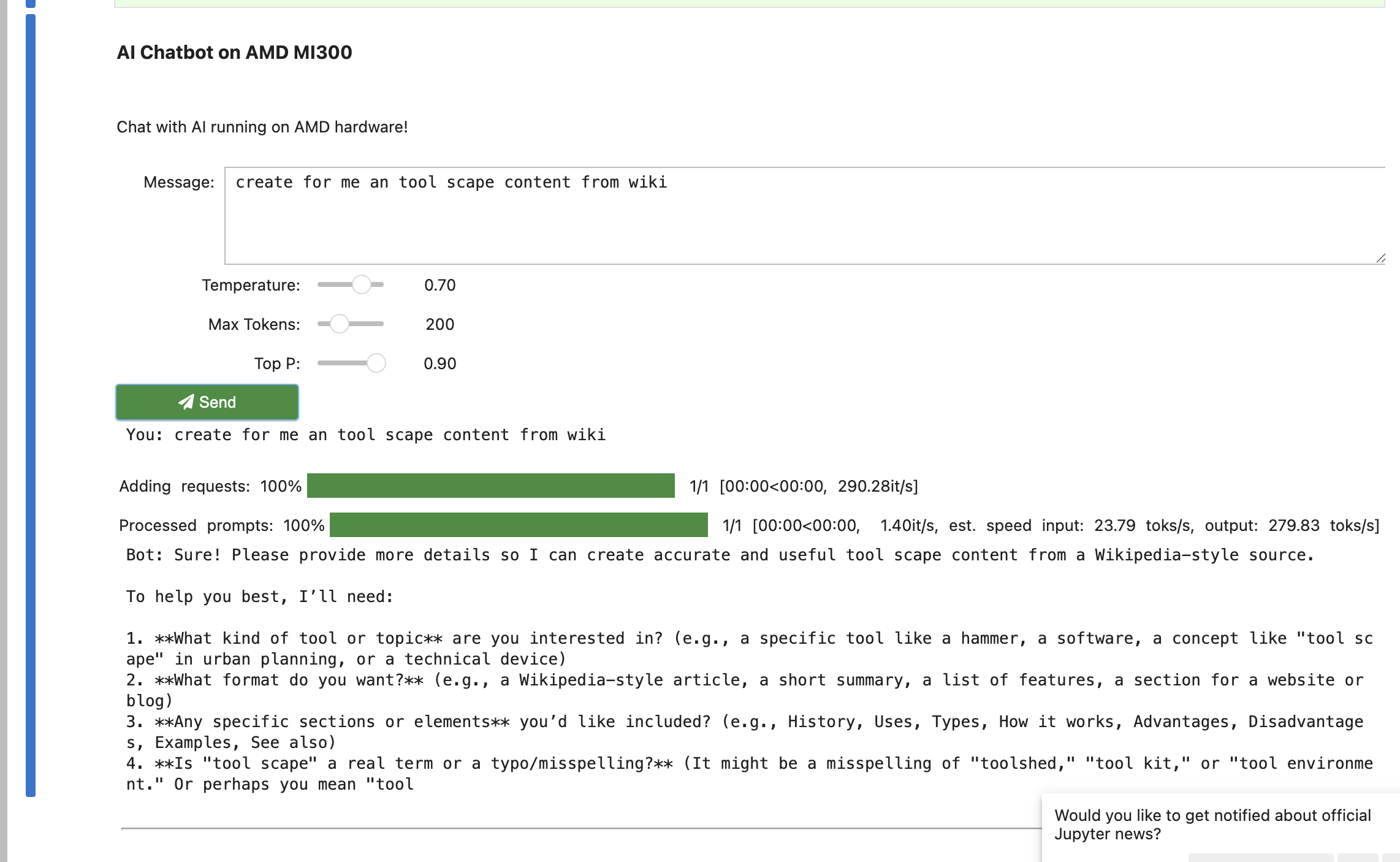
temperaturesettings and adjustedtop_pandmax_tokensto observe how output quality changes. This was especially useful because it turned “model tuning” into something visible and intuitive. - Adding a Simple Interface with ipywidgets: Beyond terminal-style interaction, I also practiced building a lightweight graphical interface using
ipywidgets, including sliders for generation parameters. This made the project feel closer to a real prototype than just a notebook exercise.
In short, this lab did not just teach me what a chatbot is. It taught me how the main pieces fit together in an actual working implementation.
Seeing this run on a hosted VM also changed how I think about AI infrastructure. Instead of just calling a chatbot API, I could observe the workflow more directly: loading the model, sending prompts, waiting for inference, and seeing how GPU-backed execution affects the responsiveness of the system. For me, that was one of the most exciting parts of the lab.
Here is one of my notebook runs where I tested the basic chat loop and watched the model respond in the Jupyter environment:
I also experimented with the widget-based interface, where I could adjust parameters like temperature, max_tokens, and top_p while chatting:
3. Practical Applications: How I Will Use This
This lab has immediate value for my own development workflow and future AI projects:
- Rapid Prototyping: I now have a clearer path for building small chatbot prototypes quickly, starting from a model endpoint and a conversation structure before worrying about full product complexity.
- Better Prompt Engineering Habits: The system prompt exercises showed me that behavior design is not an afterthought. In future projects, I will treat prompt design as part of the core application logic.
- More Intentional Parameter Selection: Rather than using default values blindly, I now better understand when to use lower temperature for factual assistants and higher temperature for brainstorming or creative tasks.
- Bridging Backend and UI Thinking: Because the lab went from inference code to a simple user interface, it reinforced an important lesson for me as a developer: even AI experiments become much more meaningful when they are wrapped in usable interaction flows.
4. Learning Progress & Evidence
To document this learning milestone, here is my verification evidence:
- Status: Completed
- Platform: AMD AI Academy
- Verified Certificate: View Certificate (PDF)
- Practice Platform: AMD AI Academy
The certificate is issued by AMD AI Academy, and the practice environment reflects the hands-on work completed alongside the course content.
Conclusion
"Building Your First AI Chatbot" helped me move from simply understanding that LLMs can generate text to understanding how a usable chatbot is actually assembled. More importantly, it gave me direct experience with the chain from model inference to behavior control to basic interface design.
For me, that makes this lab a strong complement to more strategic AI courses: it turns abstract AI concepts into something I can build, test, and improve with my own code.
![[Review] Beyond the Code: Key Takeaways from Andrew Ng's "AI for Everyone"](https://images.pexels.com/photos/8386440/pexels-photo-8386440.jpeg?auto=compress&cs=tinysrgb&w=1200)
