Practicing CI/CD for Microservices: A Journey with Jenkins and ArgoCD
Setting up CI/CD for a single monolith is straightforward. But when I started working on YAS (Yet Another Shop)—a practice project with over 10 Java Spring Boot microservices—things got interesting. This post isn't about a "perfect" enterprise system; it's a summary of how I automated the workflow and the hurdles I faced along the way.
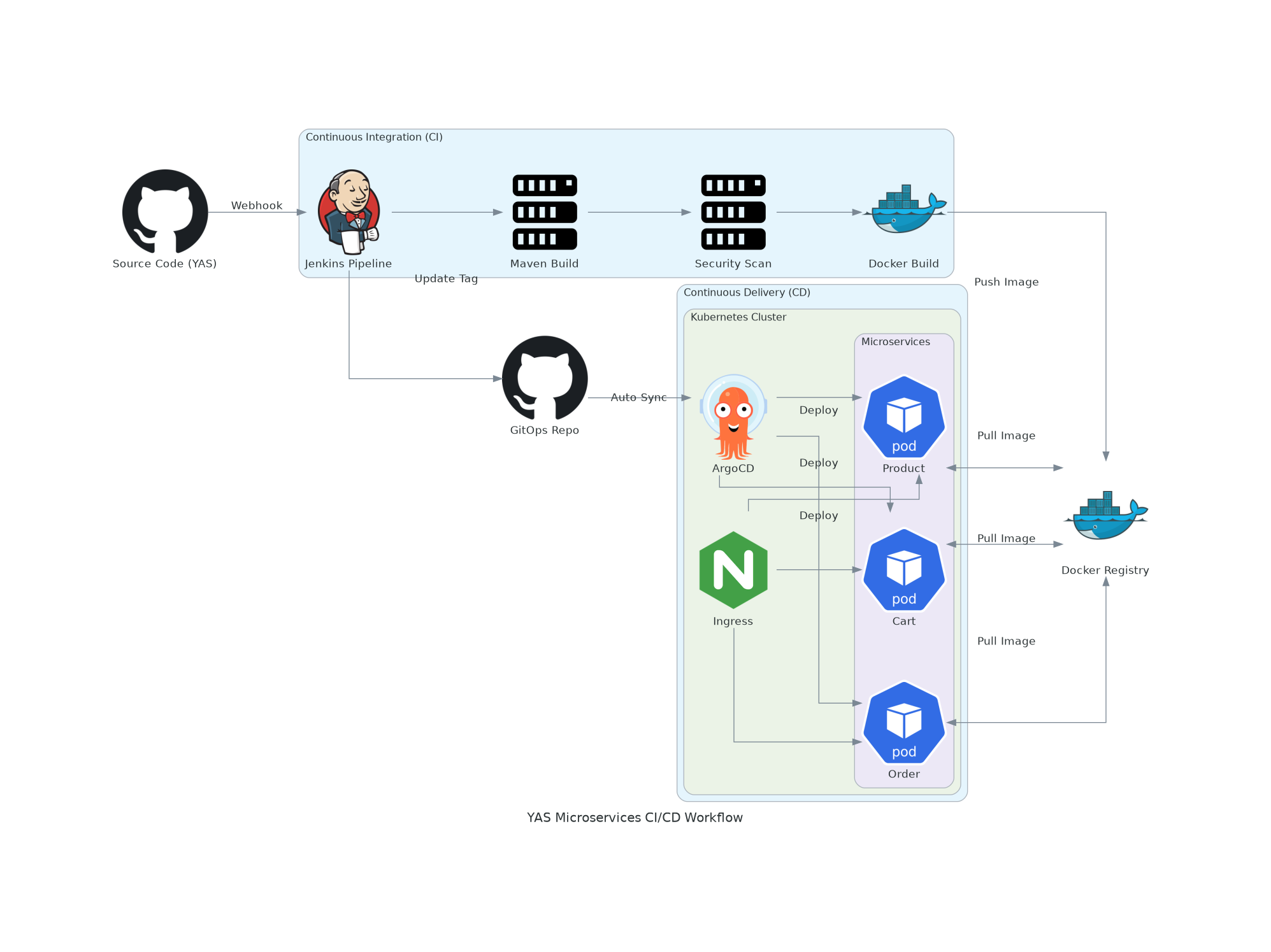
1. The Workflow Construction
The goal was simple: Push code to GitHub and see it running on my Proxmox K8s cluster.
I chose the GitOps approach because it separates the "Build" (CI) from the "Deploy" (CD), making it easier to manage state.
The CI Phase (Jenkins)
Jenkins sits on a public VPS. Its job is to watch the main YAS repo.
- Multi-branch Support: Since there are many services (Product, Order, Cart...), I used Multibranch Pipelines to handle each service separately.
- Standardizing the Build: Every service is Java-based, so I standardized the
mvn clean packagestage. - Dockerization: Building images is the most resource-intensive part. I applied multi-stage builds here to keep images small (Alpine-based) and build times under control.
The CD Phase (ArgoCD)
Instead of Jenkins pushing to K8s directly (which would require exposing my cluster API to the public internet), I used ArgoCD inside my cluster to "pull" changes.
- Jenkins updates a separate GitOps repository with the new image tag.
- ArgoCD detects this commit and syncs the cluster state.
2. Real-world Challenges & Lessons
It wasn't all green builds. If you look at my Jenkins dashboard, you'll see several red marks. Here’s what actually happened:
Challenge 1: The Connectivity Gap
Jenkins is on a VPS, while my Kubernetes cluster is in a local Proxmox lab.
- Problem: How does Jenkins push the image where K8s can see it?
- Solution: I had to set up a secure Docker Registry and ensure Jenkins had the right credentials to push, while K8s had the
imagePullSecretsto pull. Managing these secrets across multiple services was my first "headache."
Challenge 2: Resource Constraints & Slow Builds
Java Spring Boot is heavy. Running 10+ builds on a limited homelab setup can easily crash the nodes or take forever.
- Fix: I had to be very aggressive with Docker layer caching. By carefully ordering commands in the Dockerfile (copying
pom.xmlfirst, then dependencies, then source code), I cut down subsequent build times significantly.
Challenge 3: Dealing with Build Failures
Job failures (like test/product in the screenshot) are common. Most of the time, they were caused by:
- Integration Test Flakiness: Services failing to connect to a temporary database during the test phase.
- Resource Exhaustion: Jenkins agents running out of memory.
- Dependency Versioning: One service updating its API and breaking the others.
These failures taught me that CI/CD isn't just about automation; it's about visibility. Without Jenkins logs, I would have spent days guessing what went wrong.
3. What's Next?
This setup is still a work in progress. It's a practice ground for me to understand the "moving parts" of a distributed system.
Next on the list is integrating the PLG Stack (Prometheus, Loki, Grafana) to see why a service fails after it's deployed, not just that it failed.
About the author: Ngô Tấn Tài (newnol) - Learning by doing, one build failure at a time.
