Case Study: Homelab Infrastructure Automation (IaC)
TL;DR
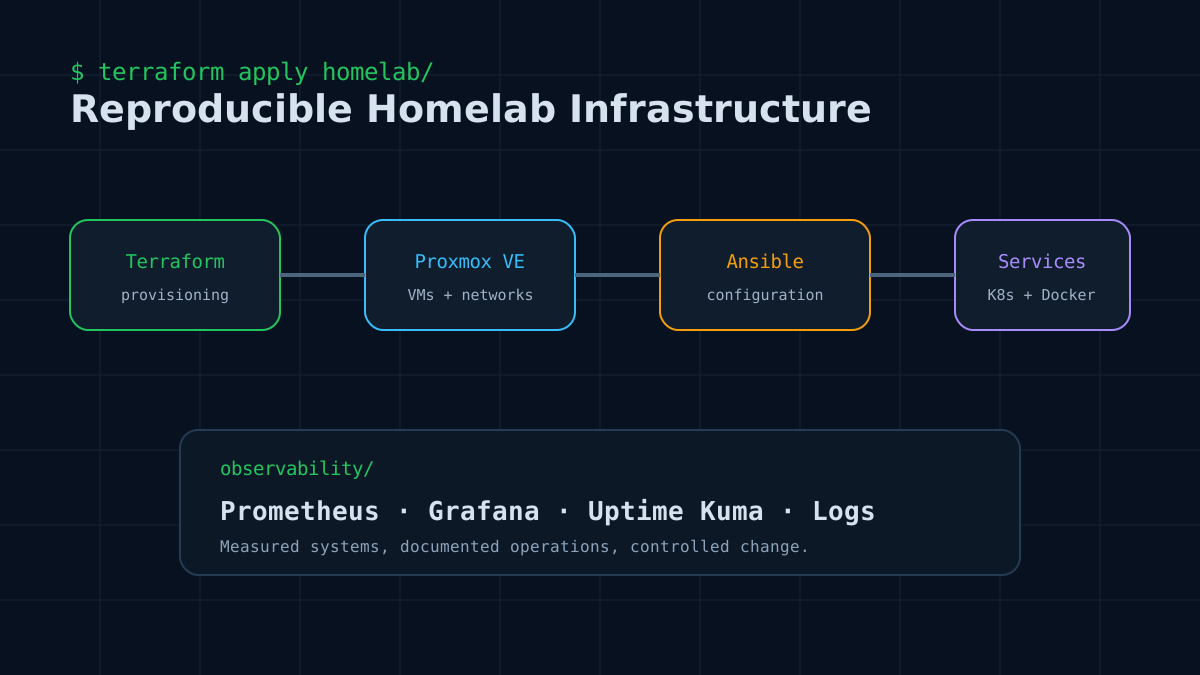
This project demonstrates the practical application of Infrastructure as Code (IaC) and GitOps principles in a Homelab environment. By combining Terraform for provisioning resources on Proxmox and Ansible for configuration management, the entire process of spinning up a virtual machine, installing Docker, and setting up a Monitoring system (Prometheus & Grafana) has been 100% automated.
- Role: Cloud DevOps Engineer (100% solo project)
- Tech Stack: Terraform, Ansible, Proxmox VE, Docker, Prometheus, Grafana, Ansible Vault.
- GitHub Repo: newnol/homelab-infra
The Challenge
Previously, whenever I needed a virtual server environment (LXC/VM) on Proxmox to test an application, I faced a series of tedious manual tasks:
- Initializing the LXC container, assigning a static IP.
- Installing SSH keys, creating users.
- Installing prerequisites like Docker, Docker Compose, Git...
- Setting up the environment and network configuration (DNS).
This process was time-consuming, highly prone to human errors, and most importantly, lacked consistency. As the number of containers grew, managing and scaling them became a nightmare. A 100% automated solution via Code (IaC) following GitOps standards was a must to definitively solve this bottleneck.
Architecture & Implementation
To solve the aforementioned problem, I built an end-to-end automation pipeline from scratch, consisting of the following key components:
1. Terraform: The Heart of Declarative Provisioning
Instead of manually clicking through the Proxmox UI, I used Terraform to define the desired state (Declarative) of the infrastructure:
- The Terraform code is organized into highly reusable Modules. Thanks to this design, scaling up a new Node or even a whole Cluster only takes a few seconds of parameter modification.
- Fully automated the creation and network configuration for Proxmox LXC containers.
2. Ansible: The Configuration Management Companion
After the server resources are provisioned by Terraform, Ansible takes over the configuration step:
- Automatically runs Playbooks to install essential System Packages and Mount Volumes.
- Automatically configures DNS pointing to AdGuard Home.
- Ensures a consistent environment across dozens of different virtual servers.
3. Golden Image Strategy: The Ultimate Speed Hack
The biggest difference between a "manually setup" system and a DevOps-standard system is the readiness of the Image.
💡 Why Golden Image? Instead of running Docker/Containerd installation scripts every time a new machine is created, I use Ansible to "bake" all the core software into a pristine Ubuntu installation. Then, I configure Proxmox to turn it into a Template (Golden Image). Ever since, the time to initialize a new Node (like a Web Server or Agent Server) dropped from ten minutes to just a few seconds because everything is cloned directly from the Golden Template! This completely solves the speed problem and guarantees 100% system uniformity.
4. Secret Management: Security First with Ansible Vault
Pushing code to GitHub (GitOps) is great, but how do you prevent exposing sensitive Proxmox API tokens or SSH passwords?
🔐 Absolute Security with Ansible Vault + Wrapper Script I integrated Ansible Vault directly with Terraform via a wrapper bash script. This script acts as an intermediary, using Environment Variables to securely pass and decrypt server passwords. As a result, there are absolutely no plaintext passwords hardcoded on the GitHub Repository, ensuring strict adherence to Zero Trust principles right from the source code.
5. Observability
To ensure the infrastructure is always under control, I designed a dedicated monitoring architecture:
- Wrote specialized Ansible Roles for the automated deployment of Prometheus and Grafana via Docker Compose.
- Automatically attached Node Exporter to all newly created containers and servers to collect hardware metrics (Traffic, CPU, RAM, Disk IO).
- As a result, I have a real-time, intuitive Dashboard reflecting the overall health of the entire Homelab.
Key Takeaways
- Infrastructure as Code isn't just for the Cloud: Homelabs can absolutely adopt Enterprise-grade standards like Terraform and Ansible. This optimizes learning and testing drastically.
- Golden Image Strategy is a game-changer: Setting up and maintaining Golden Templates minimizes "Configuration Drift" and saves countless hours of running daily scripts.
- Security must be a Day 1 design: Integrating Ansible Vault with Terraform from the start keeps the system robust against credential leak risks.
- GitOps is the future: Now, my entire Homelab's state lives on a Git repository. Destroying and Rebuilding the whole system only requires a simple
terraform apply!
Thank you for reading this Case Study. If you found the project helpful, feel free to visit the GitHub Repository to leave a Star and reference the source code!